Concepts
Airfield Overview
Airfield runs each part of a robot’s ROS 2 stack in its own Docker container, without changing how the ROS code itself is written or built. It defines a consistent project layout, package metadata schema, and command surface so teams can build and run their code reproducibly on a laptop, in CI, and on the robot.
This page walks from the command surface down to what actually happens at
launch time through one example
project: my_robot/, with three Airfield packages called base_driver,
camera_driver, and nav_stack.
Tip: green dashed terms in the text are clickable. Click one and the part of the diagram it refers to lights up.
Core principles
- Encapsulated package execution with isolated dependencies
- Convention-over-configuration project layout
- Explicit dependency declarations by target architecture (arm64, x86_64)
- Deterministic orchestration from package plans
- Flexible enough for research iteration, strict enough for production bring-up
The command surface
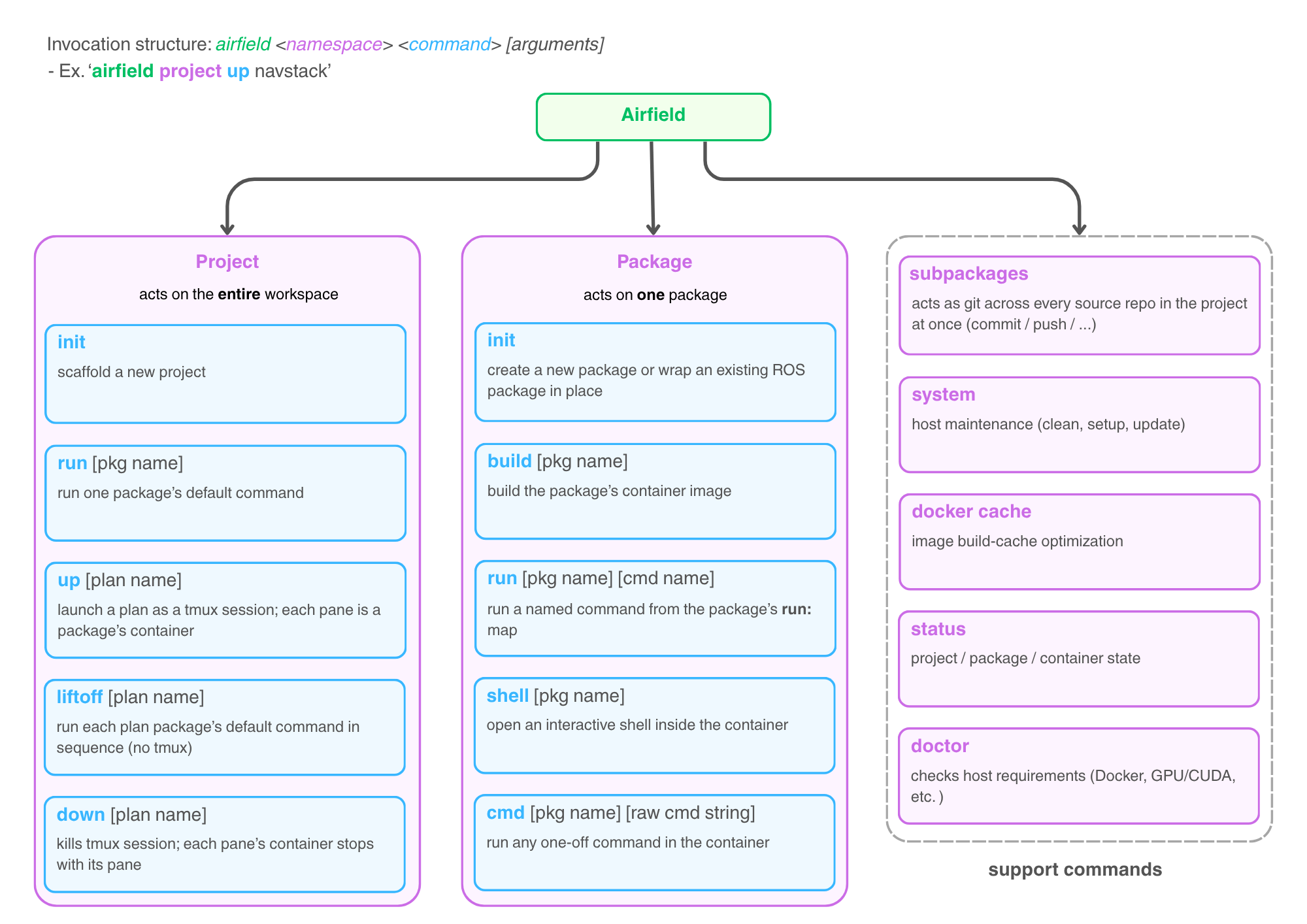
Every invocation has the same :
airfield <namespace> <command> [arguments]. The two namespaces mirror
Airfield’s two core nouns:
- act on
the whole workspace:
initscaffolds a new project,uplaunches a plan (described below) as a tmux session,downtears it down again,liftoffruns package defaults one after another without tmux, andrunexecutes a single package’sdefaulttarget. - act on
one Airfield package:
initcreates a new package or wraps an existing ROS package in place,buildproduces its container image,runexecutes a named target from itsrun:map,cmdruns any one-off command inside the container, andshelldrops you into an interactive shell there. - The is support tooling.
The one to know early is
doctor, which checks host requirements (Docker, GPU/CUDA, tmux, …) before anything can fail mysteriously;subpackagesacts as git across every source repo in the project at once.
There are also two additional conveniences. First, a [pkg name] argument can be
omitted when your shell is already inside that package’s folder, because
Airfield detects the package from the working directory (build is the one
exception: pass .). Second, commands resolve by unique prefix, so
airfield pa b means airfield package build.
A project on disk
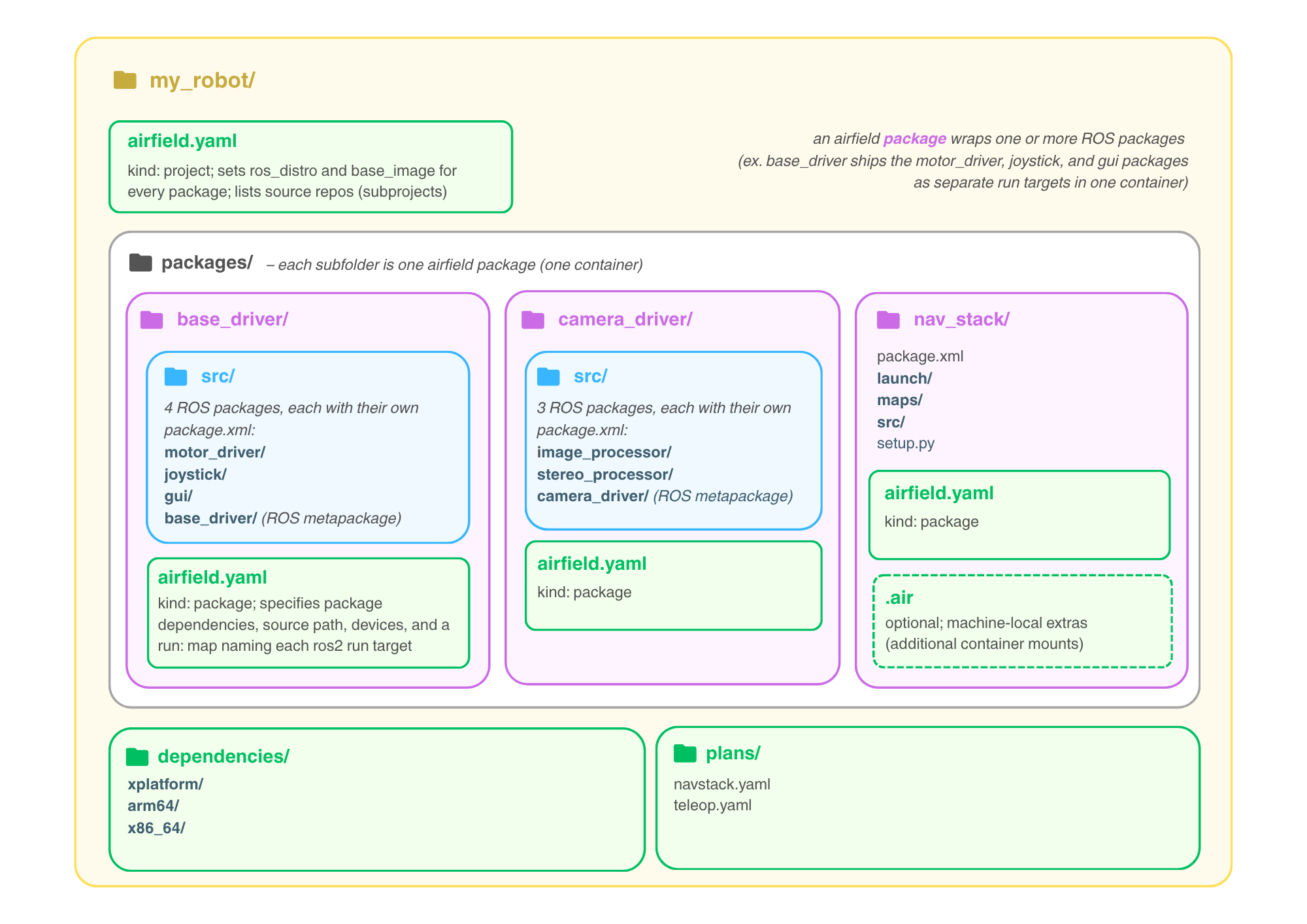
A project is a normal directory with four Airfield-specific pieces at the root:
- The project
(
kind: project) sets the defaultbase_imagethat every package inherits and theros_distrothat new packages start with, and lists the source repos that make up the project. - holds the Airfield packages: each subfolder is one package, and each package becomes exactly one container image.
- holds
small YAML manifests, one for each dependency that needs a recipe of its
own (a source build, a pip package, an install that differs per machine),
split by architecture (
arm64/,x86_64/) withxplatform/for recipes that work everywhere. These are the project’s own manifests; a name with no manifest here falls through to the same two folders in the shared Airfield packages repository. Most dependencies need no manifest at all: a name that has none is installed as the apt package rosdep maps it to. See Manage Dependencies. - holds descriptions of what a full launch looks like.
The central idea in this diagram: an Airfield package wraps one or more
ROS packages.
bundles three (motor_driver, joystick, gui);
bundles
two; wraps
exactly one. In that last case the package’s own folder is the ROS package
(source_path: "."), which is why its package.xml sits at the top level
right next to airfield.yaml.
Note: containers isolate dependency environments, not ROS packages. It is preferred to bundle ROS packages whose dependencies agree, and split out a separate Airfield package where dependencies diverge. Bundling costs no runtime isolation since at launch each pane still gets its own container, as the last diagram shows.
The extra base_driver/ and camera_driver/ folders marked (ROS
metapackage) are the glue that makes bundling work; they’re explained in the
next diagram. The optional
file holds machine-local extras (such as additional container mounts) that
belong to one machine rather than to the shared package config.
Inside one Airfield package
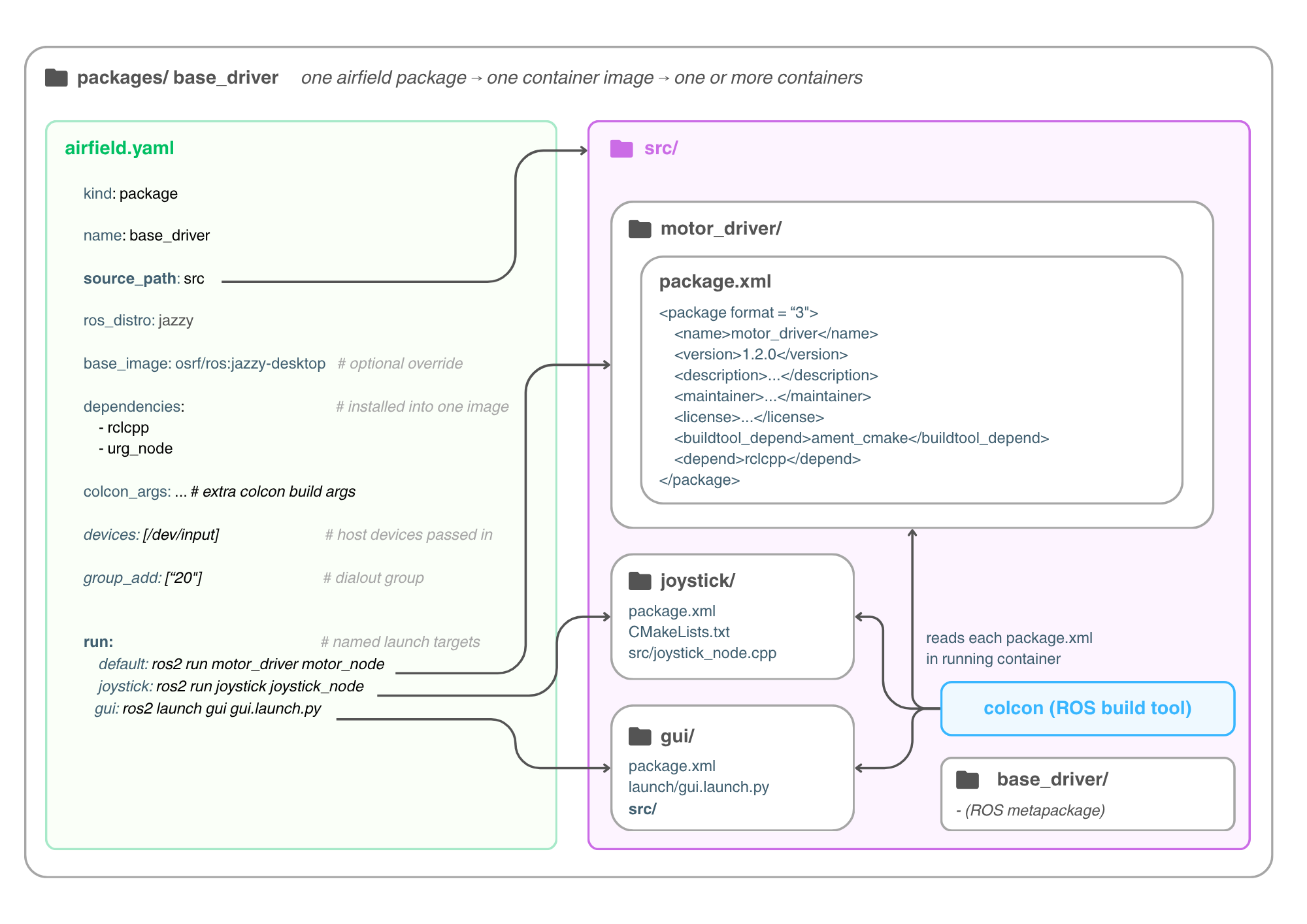
Zooming into packages/base_driver/: the left side is its entire
; the right side
is the source tree it points at.
- names the
folder that colcon treats as the workspace source. Here
holds three
ordinary ROS 2 packages
(,
, and
), each with its own
package.xml, untouched by Airfield. (When a package wraps a single ROS package,source_path: "."skips the inner folder entirely; seenav_stackin the previous diagram.) - are installed
into the package’s one shared image (next diagram). The list only has to
hold what the
package.xmlfiles do not say, because , every time it builds the image:urg_node, a driver nopackage.xmlhere names, belongs in it, whilerclcppis already covered bymotor_driver’spackage.xml. -
pass hardware through to the container (here
/dev/inputplus the dialout group for serial ports). - The gives memorable
names to launch commands. Note that the targets invoke the inner ROS
packages’ executables (
ros2 run motor_driver motor_node), because by the time these commands execute, the container is just a sourced ROS workspace that has built. - The fourth folder in
src/, the , is a ROS package with no code that only depends on the other three. It deliberately shares the Airfield package’s name: on the first run Airfield buildscolcon build --packages-up-to base_driver(next diagram), and that name match is what lets a single command build the whole bundle.
Note: the src/ at the top of the package (Airfield’s
source_path) is a workspace-style folder that holds whole ROS packages,
while the src/ inside gui/ is that ROS package’s own C++ source folder.
What sits below each inner package is decided by that package’s build type, which is a ROS convention rather than anything Airfield imposes:
ament_cmake(C++), which is what all three packages above are:.cppfiles go insrc/and headers ininclude/<package_name>/, next topackage.xmlandCMakeLists.txt.ament_python: the code lives in a folder named after the package itself, so a Pythonmotor_driver/would hold a secondmotor_driver/besidepackage.xmlandsetup.py. That inner folder is a Python module directory, meaning a folder with an__init__.pyin it that Python treats as one importable unit, which is what lets the node be reached asimport motor_driver.motor_node.
Build vs run: the two-phase lifecycle
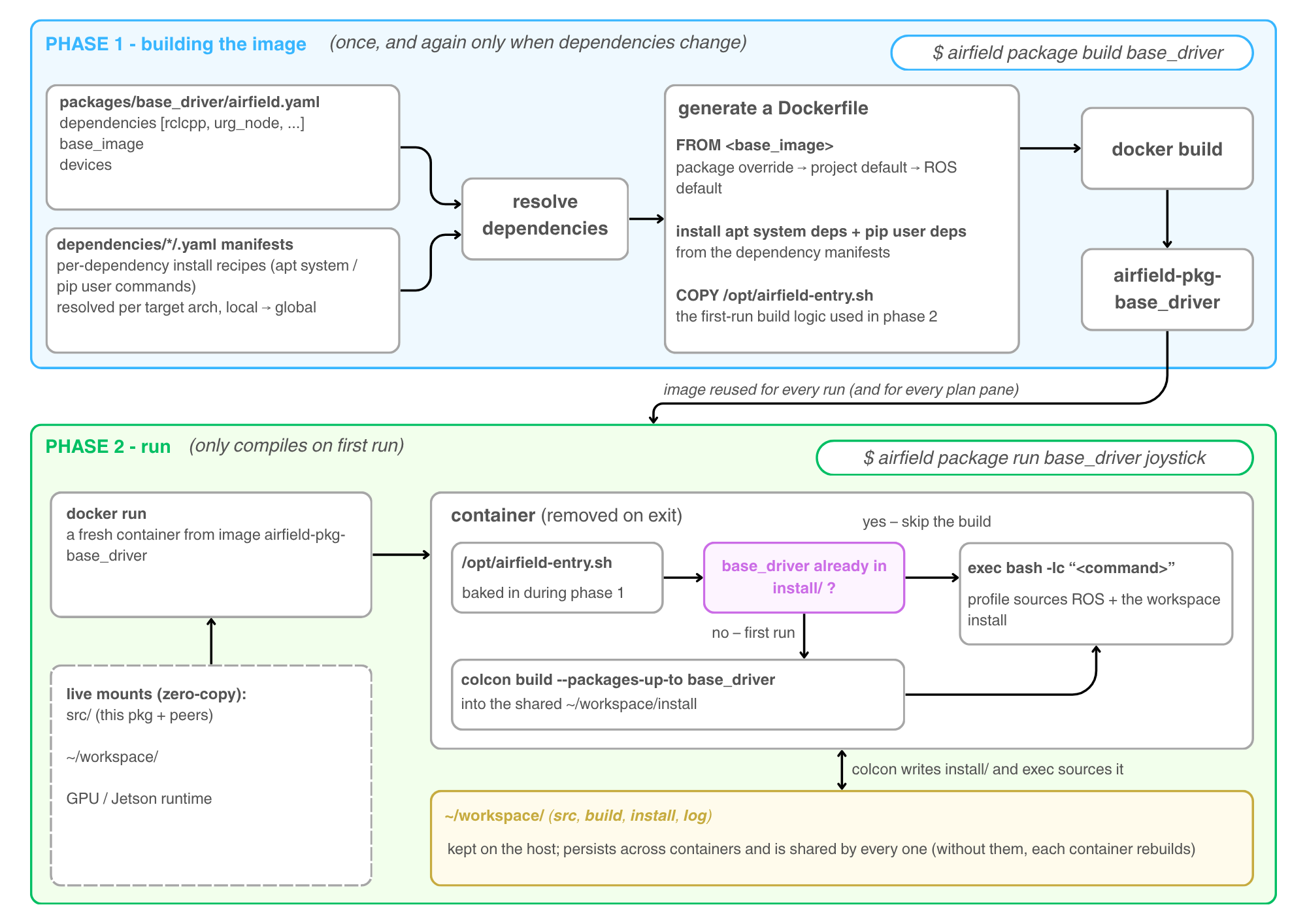
Phase 1: airfield package build produces an environment image,
. It
(the
entries in its ,
plus )
against the , and
translates a name that has no manifest into its apt package the way rosdep
does. It then : a
base image (package override, else project default, else the ROS-distro
default), the apt/pip installs for those dependencies, and two small start-up
scripts that phase 2 uses. No ROS source is compiled into the image, which is
why it only needs rebuilding when the dependencies, the base image, or
Airfield itself change.
The image is tagged with a fingerprint of that recipe, and
: an image
this machine already has for the recipe is used as it
is, and one that another machine has pushed to the project’s image_registry
is pulled. Nothing about who builds an image goes into it, so machines of the
same kind can share one build. See
Runtime & Environment.
Phase 2: every
starts a fresh, disposable container from that image. Your source is
, so edits on the host are
instantly visible inside: no rebuild, no copy, and nothing is lost when an
image is rebuilt. The container first
, with
the same name, ids and home path as on the host, so files written to the mounts
are theirs on any machine. The
then makes : if base_driver
is already fully compiled in the workspace, it skips straight to your command;
on the first run, or if the last compile did not finish, it compiles with
,
which is where the metapackage from the previous diagram earns its keep,
pulling all three bundled ROS packages into one build. Either way it finishes
by sourcing ROS plus the workspace install and
your command.
install/ is the directory colcon writes build output into, one subfolder
per ROS package, so install/base_driver is colcon’s own record that this
bundle has been compiled. Because --packages-up-to builds the metapackage
last, after the three packages it depends on, that one folder stands for all
four. A build that fails or is cut short can still leave folders behind, so
Airfield marks a build as unfinished until it completes, and the next run
tries again (see The first-run build).
The
(src, build, install, log) lives on the host and is mounted into every
container: the first container to need a package compiles it once, and every
later one (including every pane of a plan) just sources the result.
Simultaneous first runs can’t collide; the build is serialized with a lock in
the same shared folder. None of this needs configuring — Airfield mounts the
workspace itself.
~/workspace is the path inside the container, and it is the same everywhere.
On the host, build/, install/, and log/ live in the project, at
<project>/.airfield/workspace/, so two projects never share one install/.
See Shared colcon workspace.
Anatomy of a plan
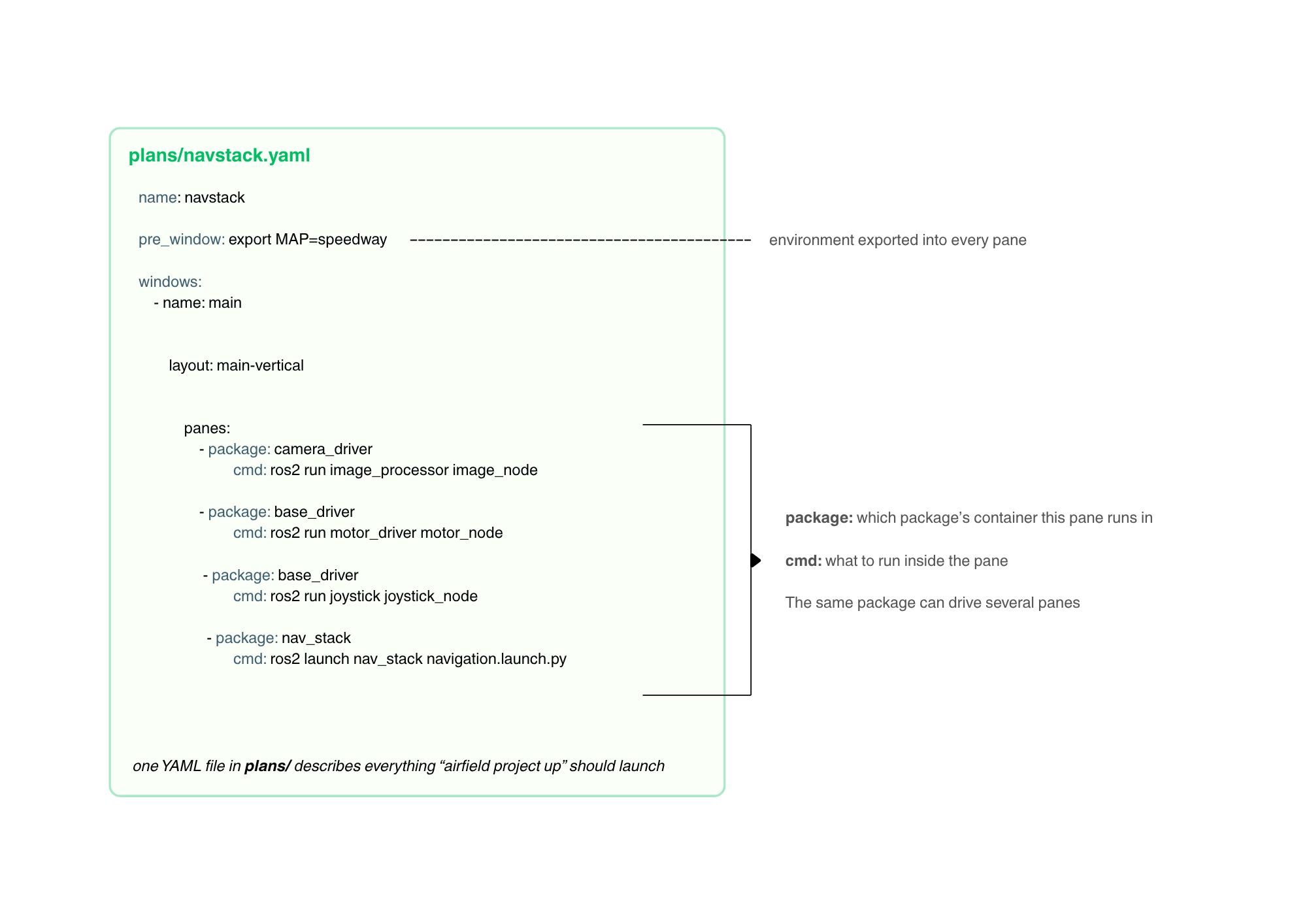
A plan is one YAML file in plans/ that describes everything
airfield project up should launch. windows split into
, and each pane sets
:
package:selects which Airfield package’s container this pane runs incmd:sets what to run there; it’s a raw shell command executed inside the container, so it addresses the inner ROS packages directly (ros2 run/ros2 launch), just like therun:targets two diagrams up
runs in every
pane before its command, in the pane’s own shell outside the container, which
makes it the place for session-wide settings like MAP=speedway. The variable
itself does not reach the container, but a cmd that writes $MAP gets the
value filled in on the way in. The same package may drive several panes (base_driver
appears in both the and the
), which costs nothing
extra: one image, two containers, as the next diagram shows. A pane can also
be left null to get a plain shell inside the session, handy for debugging
alongside the running nodes.
Launch time: project up
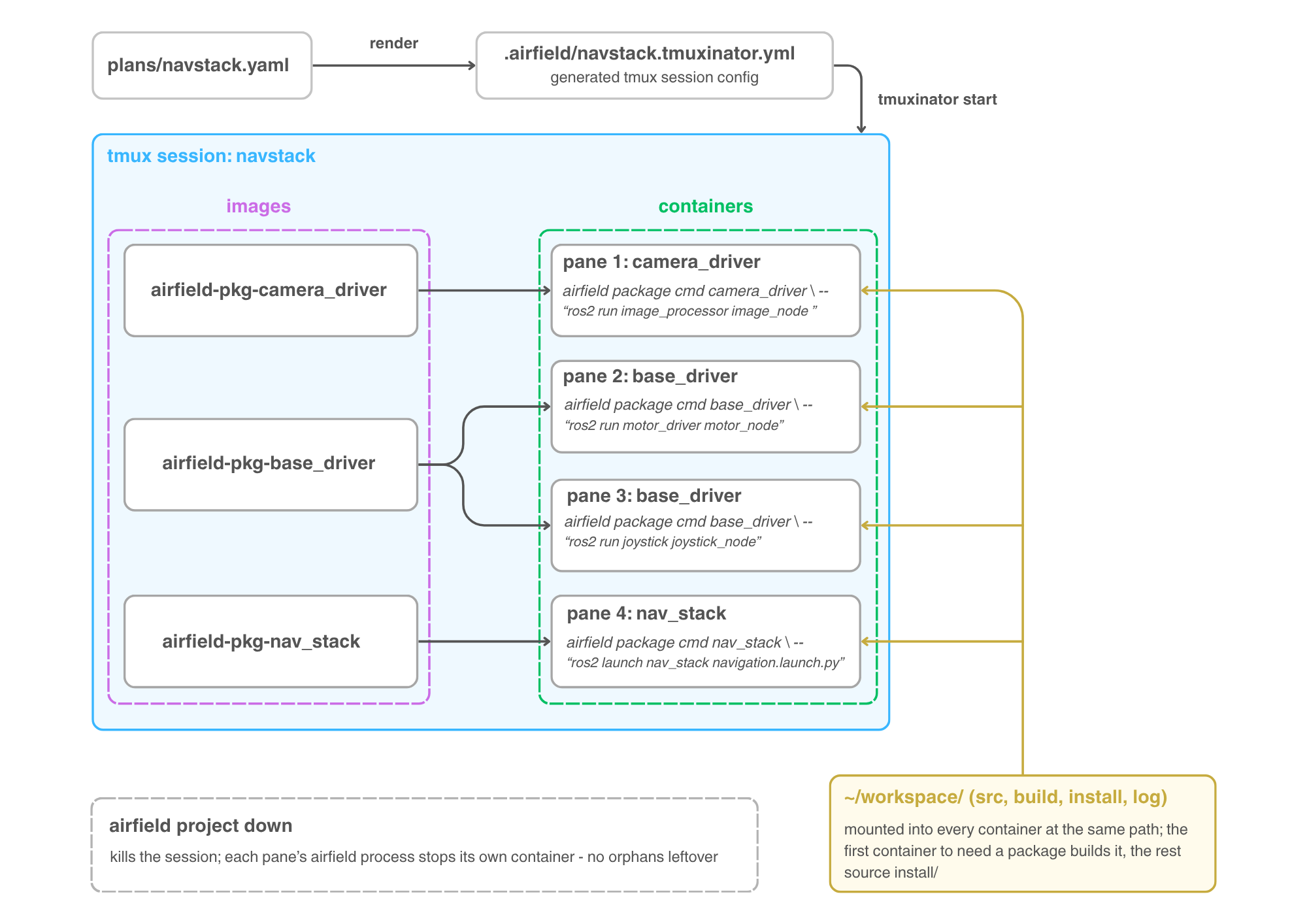
airfield project up navstack renders the
into a
(.airfield/navstack.tmuxinator.yml) and starts it as a
. Each pane executes
airfield package cmd <package> -- bash -lc "<cmd>", so the whole cmd,
including any && or pipes, runs inside the container. In other words,
every pane is exactly one phase-2 run from the previous diagram, reusing the
from phase 1.
Follow the fan-out in the middle: three images back four
. The single
spawns
two independent containers ( and
), so bundling several ROS packages
into one Airfield package never sacrifices runtime isolation. All four
containers mount the same ,
so the first pane to need a package builds it and the rest just source
install/: build once, launch many.
kills the session, and each pane’s Airfield process stops its own container on the way out, leaving no orphaned containers running.
Where to go next
Ready to try it? Quick Start walks the same loop with real commands, the tutorials cover each piece in depth, and Runtime & Environment documents how the containers are wired to the host.